Technology8 min read
Bitcoin Block Explorers Compared: What Each One Shows
Four Bitcoin block explorers show the same 2010 pizza transaction. See what each displays, who runs it, how to choose one and what the operator can see.
By Christopher CannucciariPublished
On this page
Key takeaways
- A block explorer reads Bitcoin’s public ledger and displays blocks, transactions and addresses. It holds no funds and never needs your keys.
- Four explorers show the same 2010 transaction with the same underlying facts. They differ in layout, labels, extras and in who runs them.
- Labels such as “Possibly self-transfer” or “Consolidation” are an explorer’s own guesses, not data on the blockchain.
- The operator can see which addresses and transaction IDs you look up. An explorer on your own node keeps lookups to yourself.
- No explorer needs a recovery phrase. Type the address yourself or use a bookmark.
What is a Bitcoin block explorer?
A block explorer is a website or app that reads the public Bitcoin blockchain and shows its blocks, transactions and addresses in a form you can search. It works like a public records window: you can look up any entry, but you cannot change one or move a coin through it. What Is a Bitcoin Block? explains what the pages display.
Companies run explorers, often next to other products. Open-source projects publish software that anyone can run, and community members run their own copies for the public. All of them read the same blockchain, so confirmed history should match everywhere. What differs is the presentation, the extras and what the operator does with your visit. For a step-by-step guide to using one, see How to Check a Bitcoin Transaction.
Which transaction do the four pages show?
All four captures show the payment of 22 May 2010 that Bitcoin Pizza Day commemorates. Its ID starts a1075db5 and ends 5d48d. It is old and final, so any difference between the pages comes from the explorer. The captures were taken within minutes of each other on 17 October 2026 from a machine in Europe. Three pages convert times to that machine’s zone and show a GMT+2 offset. The text quotes no prices or counts from the images, because those change.
What does each explorer show for the pizza transaction?
Blockstream Explorer
Blockstream is a Bitcoin technology company, and the page footer names Blockstream Corporation Inc. Its explorer is built on Esplora, which Blockstream publishes on GitHub under the MIT license, and the README presents blockstream.info as a live deployment. The capture opens with the transaction ID and a green badge with the confirmation count. Below come the size, weight and version, the confirmation time, and the fee with its rate per virtual byte. A row named “Privacy analysis” reads “Possibly self-transfer”. Inputs sit in a list on the left and one output on the right.
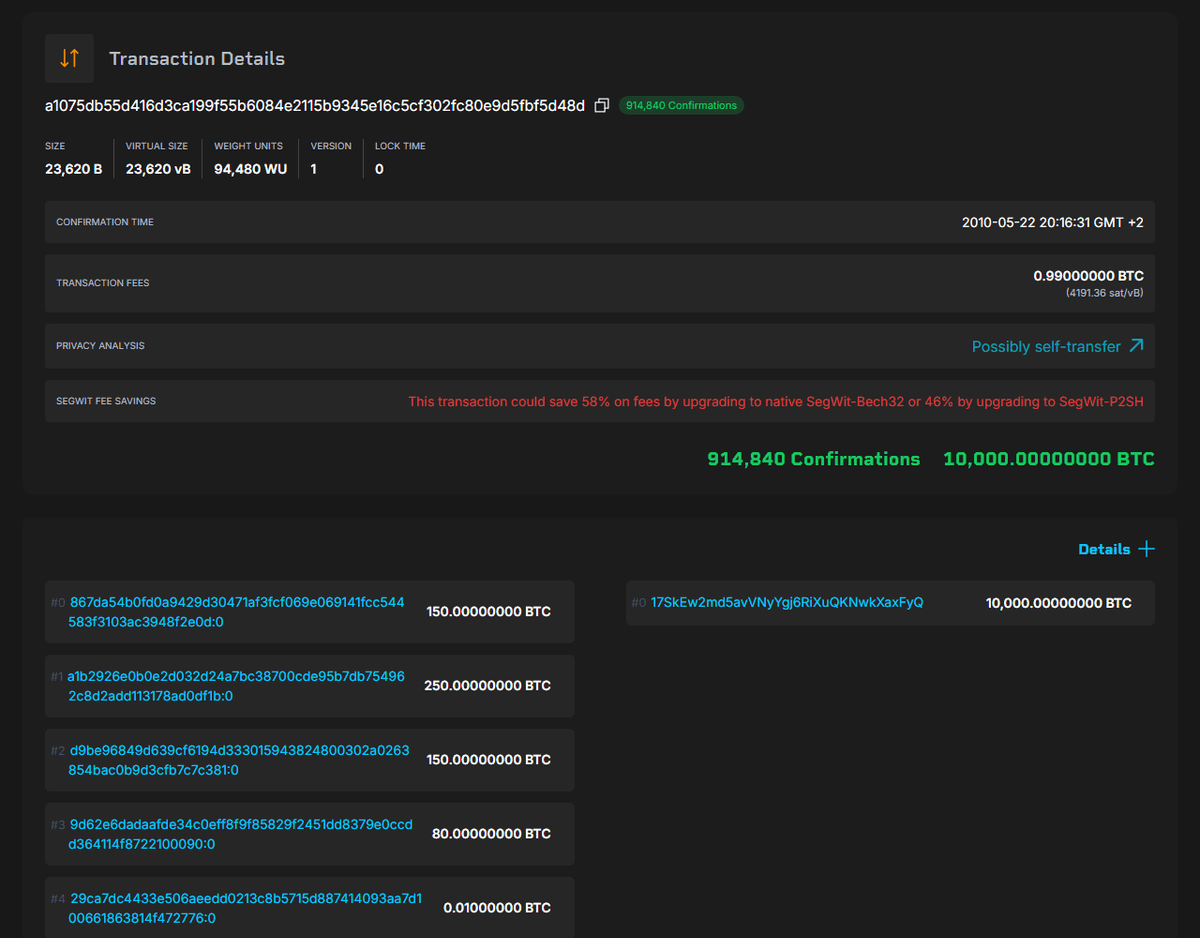
That label is a guess. Explorers infer it from a transaction’s shape, here many inputs feeding one output, which often means someone gathering their own coins. The pizza payment has that shape, yet it paid another person. Treat labels as hints and read the inputs and outputs yourself. What Is a Bitcoin Transaction ID (TXID)? explains the long code at the top.
Blockchain.com
Blockchain.com is a company that also offers a wallet app and other products. As of October 2026 its explorer home page shows prices, news and promotion beside the blockchain data. The capture is cropped to the top of the transaction page: a search box and a Sign up button, then a card titled “Bitcoin Pizza” with a “Notable” tag, a short story about the payment, a personal name in place of the recipient’s address, and a “Confirmed” status. A details table lists the block, inputs, outputs, fee and weight.
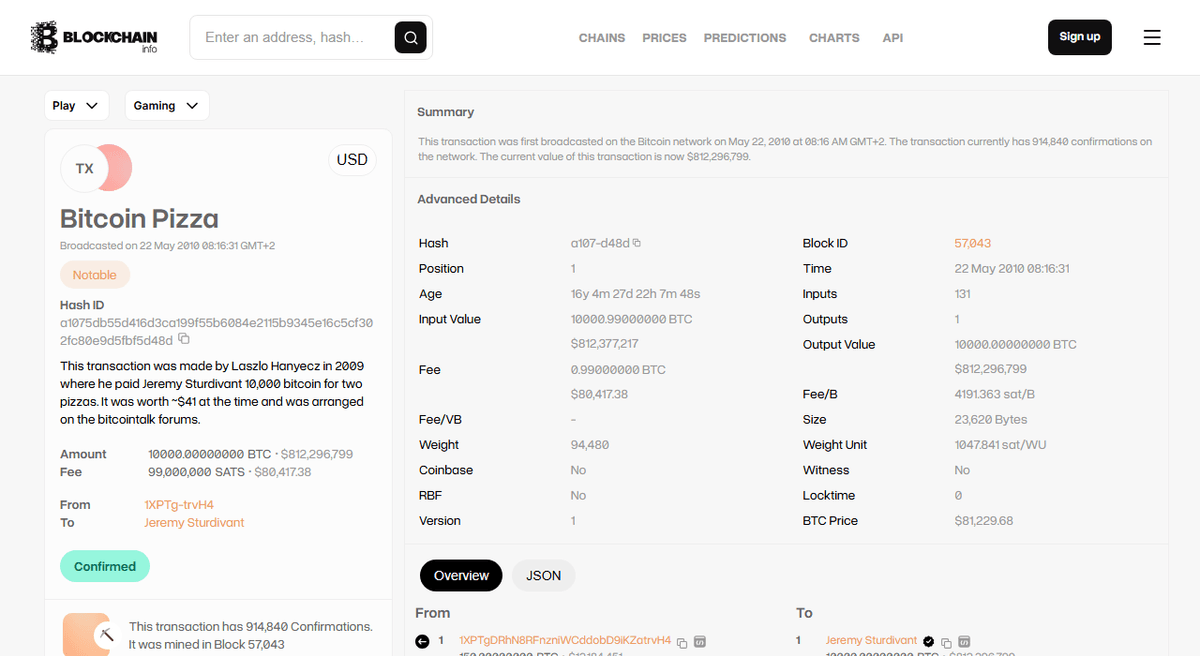
Dollar values sit beside the bitcoin amounts and move with the exchange rate, so this article repeats none of them. A name shown next to an address is the operator’s claim, not something the blockchain records.
BTCScan
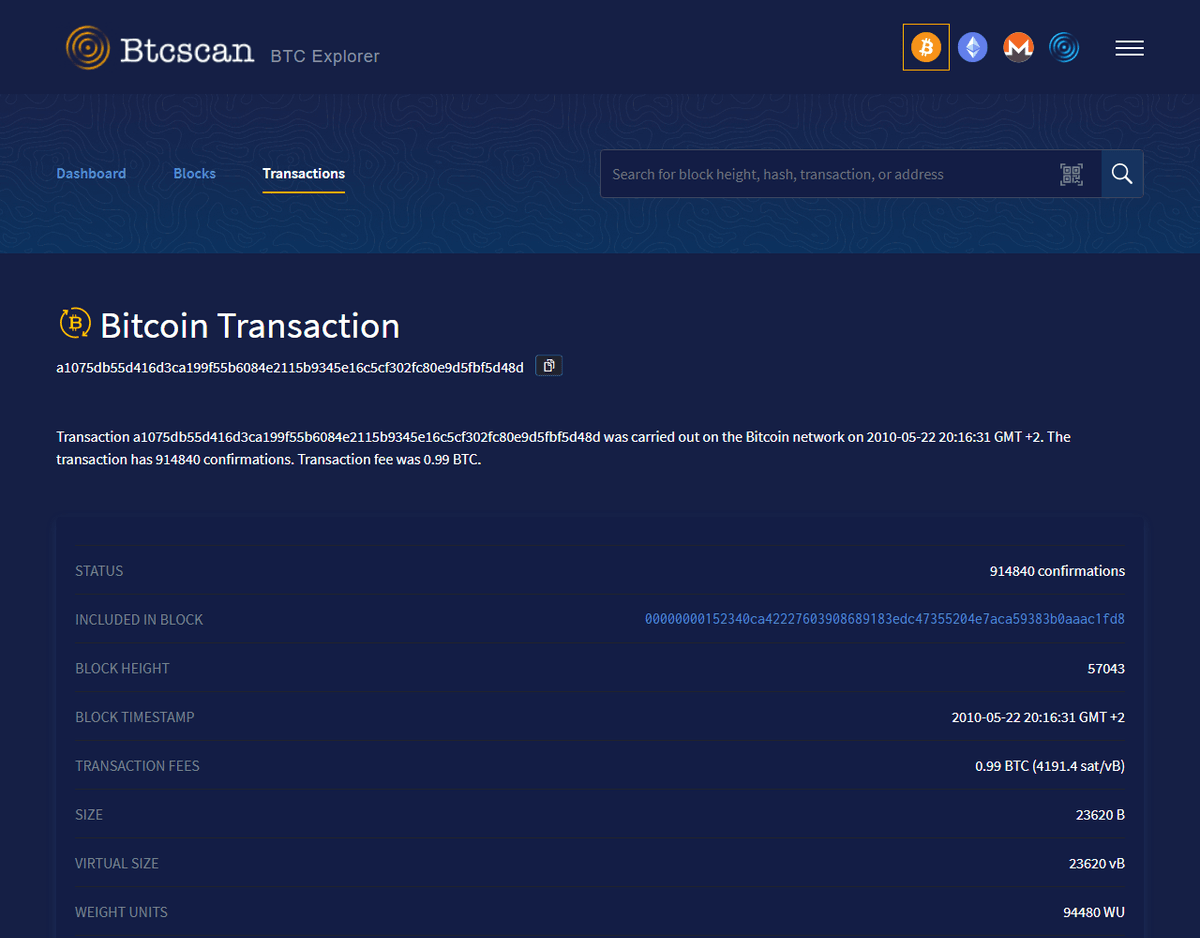
BTCScan’s home page describes it as a block explorer searchable by block height, block hash, transaction or address. The pages read for this article do not name who runs it. Its API link points to a public GitHub repository that GitHub lists as a fork of Esplora under the MIT license. The capture shows Dashboard, Blocks and Transactions tabs, a one-sentence summary, then rows for the status, block hash, height and timestamp, the fee with its rate, and the size and weight. Inputs and outputs fall below the captured area.
The mempool software on a community-run instance
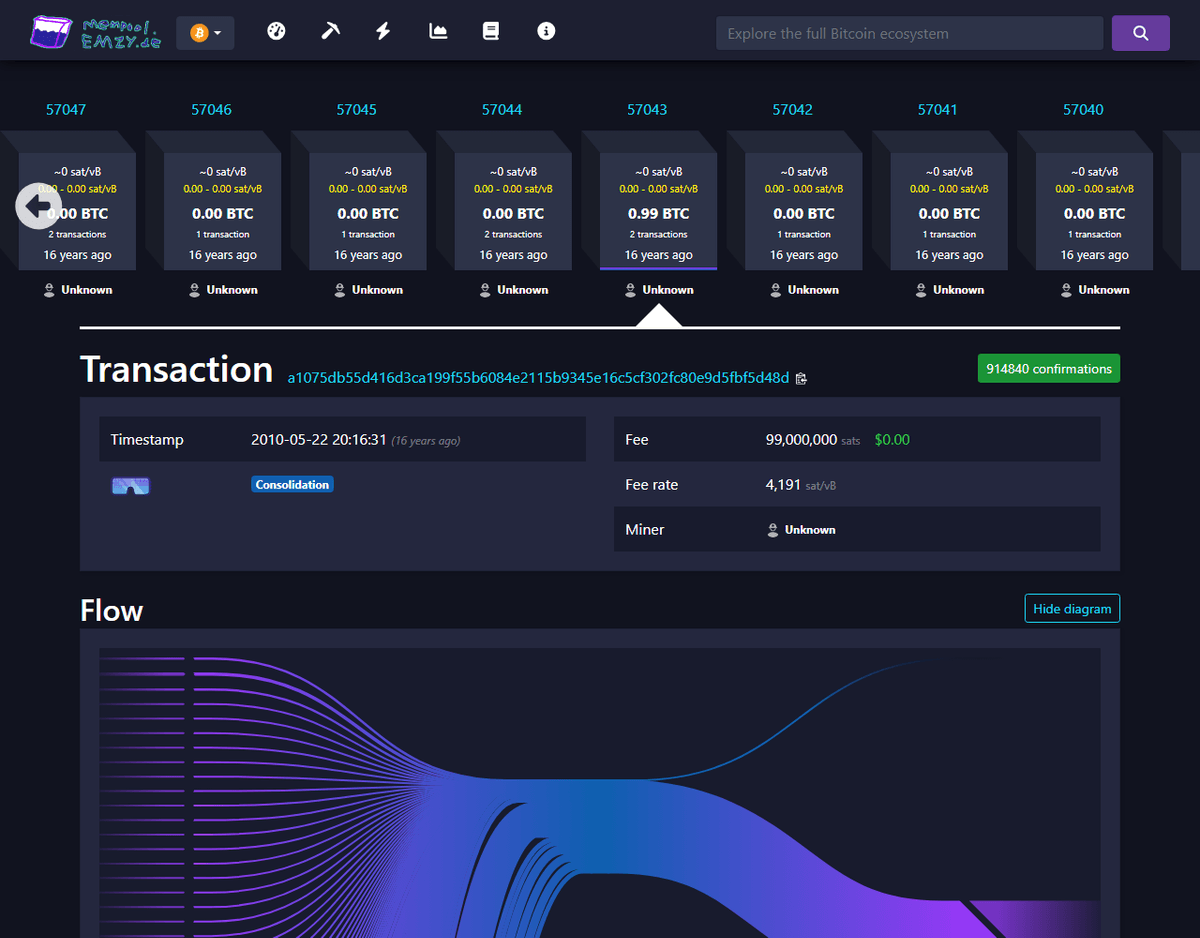
Mempool is open-source software under the AGPL-3.0 that describes itself as a mempool visualizer, explorer and API service. The best-known public instance, mempool.space, is run by the mempool project, but our screenshot tool could not capture it. This capture comes from a community-run instance at mempool.emzy.de, which its operator lists among the free services on their own site. Its About page carries the project’s standard text.
The page opens with a strip of block tiles with this transaction’s block highlighted. Then come the transaction ID, a green confirmations badge and a “Consolidation” tag, the timestamp, fee, fee rate and a miner field, and the start of a “Flow” diagram of many inputs merging into one output.
How do the four compare?
All four show a confirmation count, the fee and a fee rate, rounded differently. The table adds what differs, using only what the captures show or each explorer’s own pages state. “Not in the capture” means not seen, not absent from the site.
| Blockstream Explorer | Blockchain.com | BTCScan | mempool (emzy instance) | |
|---|---|---|---|---|
| Operator | A company, named in the footer | A company, also selling other products | Not named on the pages read | A community operator |
| Software | Esplora, MIT, public on GitHub | No open-source statement found | Linked repository is an Esplora fork, MIT | mempool, AGPL-3.0, self-hostable |
| Inputs and outputs | Listed side by side | Counts and totals, lists lower down | Not in the capture | Flow diagram |
| Labels | “Possibly self-transfer” | “Notable”, a title, a name label | None visible | “Consolidation” |
| Block context | Not in the capture | Block and position | Block hash and height | Neighboring block tiles |
| Mempool and fee views | Home page shows a recommended fee and congestion | Network stats on the home page | Header links to separate mempool and fee sites | The project is a mempool visualizer |
| Dollar values | None visible | Beside amounts | None visible | Beside the fee |
| Sign-in prompt | None visible | Sign up button | None visible | None visible |
How do you choose a block explorer?
This article ranks none of them, because the right features depend on what you are doing.
Who runs it. Prefer pages that say who operates them and link a privacy policy. The Blockstream and Blockchain.com footers both do.
Open source or not. Published code lets you inspect the software or run a copy on your own node, the only way to look things up without telling anyone. What Is a Bitcoin Node? explains what that involves.
What it shows. While you wait on a payment, the fee rate and a view of the queue matter most, and What Is the Bitcoin Mempool? explains the queue. For an old payment, confirmations and outputs are enough.
How much else is on the page. Prices, news and sign-up buttons are not wrong, but each is a reason to ask what the site records.
Why can two explorers disagree?
Confirmed facts should agree, and the presentation can still differ. In the captures the fee rate has different decimal places. Three pages show 20:16 as the clock time, while Blockchain.com shows 08:16 and its summary sentence says AM. That looks like a 12-hour clock quirk on one page, so cross-check a time on a second explorer. The chain itself records only the block’s timestamp, so a “broadcast” time for a transaction this old can be no more than that.
Pending or very recent transactions can differ for a short while. Each explorer runs its own nodes with their own settings, so a low-fee payment may sit in one waiting list and not another. When two miners find blocks almost together, explorers may briefly follow different ones. Bitcoin Fees Explained covers why fee rates decide the wait.
What can an explorer’s operator see about you?
The operator’s server sees every search you make, normally with your network address and browser details. It can tell which addresses and transaction IDs you check and link them to one visit. The ledger is public anyway, but your lookups reveal who is interested in which address. A copy of open-source explorer software on your own node answers without a third party, and a page that wants an account ties lookups to an identity. Is Bitcoin Private? and What Is a Bitcoin Address? cover how addresses get tied to people.
How do you use an explorer safely?
Treat an explorer as read-only. Type the address or use a bookmark made from a trusted source, because look-alike sites turn up in search ads. Never enter a recovery phrase, private key or password, and distrust any page that asks you to connect a wallet, validate it or pay to speed up a payment. No genuine explorer needs that, and none can move your funds.
What Is a Seed Phrase? explains why the phrase stays offline, and Common Bitcoin Scams and How to Spot Them lists the usual tricks. New to Bitcoin? The Start Here path covers the basics in order. If a lookup is part of a legal or tax matter, keep your own records and ask a qualified professional.
Where to go next
- How to Check a Bitcoin Transaction: Reading a Block Explorer: a step-by-step guide to status, confirmations and fee rate.
- What Is the Bitcoin Mempool? Why Transactions Wait: the waiting area behind every pending payment.
- Is Bitcoin Private? What Transactions Reveal: what addresses and lookups give away.
Frequently asked questions
What is a Bitcoin block explorer?
A block explorer is a website or app that reads the public Bitcoin blockchain and shows its blocks, transactions and addresses in a searchable form. It holds no funds, cannot move coins and never needs your keys or recovery phrase. Companies, open-source projects and community members all run them.
Do all block explorers show the same information?
They read the same blockchain, so confirmed facts such as amounts, block and confirmations match. They differ in layout, extra labels, fee and mempool views, dollar values, languages and how much promotion surrounds the data. Pending transactions can briefly look different, because each explorer uses its own nodes.
Why does a transaction look different on two explorers?
For confirmed transactions the underlying data is identical, but one page may round the fee rate differently, add its own guess as a label, or show the time in another format or time zone. For pending or very recent transactions, each explorer's nodes may hold a slightly different waiting list for a short time.
Can a block explorer see what I look up?
Yes. The operator's server receives each search, normally with your network address and browser details, so it can see which addresses and transaction IDs you check and link them to one visit. Running an explorer on your own node avoids sharing lookups with a third party.
Is it safe to use a block explorer?
Looking things up is safe because an explorer only reads public data. The risks are fake lookalike sites and pages that ask you to connect a wallet or enter a recovery phrase. No genuine explorer needs either, so type the address yourself or use a bookmark.